
Watch in page
Watch this guide
Use the video for visual context, then follow the written steps, tables, and version notes below.
On this page
- Empire systems confirmed by official sources
- Company screen: what to check before upgrading
- If a Company feature remains locked
- When does the Company system unlock?
- Recommended expansion order
- How to evaluate a business
- Territory and Crew risk
- Business mistakes to avoid
- Company achievement targets
- Version and availability notes
Empire systems confirmed by official sources
- Run and expand underground businesses.
- Build a Crew and recruit members.
- Upgrade safehouses.
- Expand across Rooklyn districts.
- Fight rival factions in turf wars.
- Generate income from controlled blocks and lose respect when territory is lost.
Company screen: what to check before upgrading
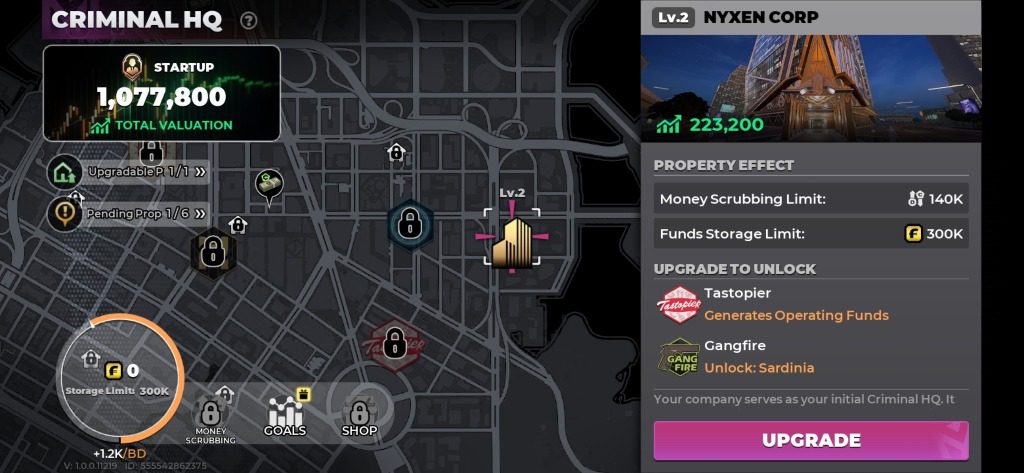
The Company interface connects Criminal HQ management with properties, Funds, money processing, and operational tasks. Treat each visible card as an instruction for the current account: a creator guide can show the feature, but the in-game requirement and cost decide whether it is available to you.
| Screen field | Player question | Record before spending |
|---|---|---|
| Company level or valuation | What does the next level actually unlock? | Current value, next requirement, and any displayed reward |
| Property | Is income passive, collected manually, or tied to a task? | Purchase/upgrade cost, collection button, and timer |
| Funds | Which wallet pays for this upgrade? | Currency label, balance, and whether Dirty Money is accepted |
| Operational Goal or event | What objective advances the Company? | Target, expiry, entry cost, and completion state |
| Money Scrubbing | Is the conversion ready now or still processing? | Submitted amount, received amount, limit, timer, and reset |
| Company Store | Is the item permanent, limited, or account-bound? | Item name, price, purchase limit, and version |
If a Company feature remains locked
- Open the current story, Contact, and Company objective list and complete the requirement written there.
- Check the phone and Criminal HQ again after the objective completion screen.
- Confirm that the account is on the same region and game version as the guide you are following.
- Capture the lock message before asking for help; the exact wording is more useful than a guessed level.
- Do not buy currency or property to test a lock unless the game clearly shows the purchase requirement.
When does the Company system unlock?
A detailed TapTap player review reports that Company access opens after reaching level 20. Treat level 20 as a route to check, not a universal unlock promise: account progression, completed story or Contact missions, region, and version may also affect when the Company prompt appears.
- Reach level 20 through the normal story and activity path.
- Finish any active tutorial, story, or Contact objective that blocks new menus.
- Return to the phone, map, or Criminal HQ interface and look for the Company prompt.
- If it is still locked, record the exact on-screen requirement instead of spending currency blindly.
- Do not assume a test-build unlock carries into another regional or release build.
Recommended expansion order
| Stage | Requirement before advancing |
|---|---|
| 1. Core progression | Tutorial, story and Contact access, usable weapon, reliable vehicle |
| 2. Stable cash flow | Known earning route and reserve for mission costs |
| 3. First business systems | Verified setup cost, processing rule, and collection method |
| 4. Crew and heists | Team access, suitable equipment, communication, and role clarity |
| 5. Territory expansion | Enough resources to capture and defend without blocking core upgrades |
| 6. Optimization | Compare net income, timers, risk, and version changes across operations |
How to evaluate a business
- Record purchase and upgrade cost.
- Identify whether income is active, passive, or requires collection.
- Measure the real collection interval.
- Subtract processing loss and recurring costs.
- Note prerequisites, daily limits, and territory dependencies.
- Calculate break-even time only from verified values.
Territory and Crew risk
The official site states that claimed blocks generate income and lost blocks cost respect. Expansion therefore creates a defense obligation, not just passive profit. A larger map footprint is weak progress if it consumes more ammunition, time, and Crew effort than it returns.
Business mistakes to avoid
- Buying an operation before its collection rules are understood.
- Spending the emergency reserve on an upgrade with no measured benefit.
- Expanding territory faster than the Crew can defend it.
- Treating gross income as profit.
- Copying a pre-patch break-even calculation.
Company achievement targets
The current Achievements menu shows a company-valuation target and a first-company milestone. Use them as progress checks after the Company system opens; the menu does not show the full path or the business costs needed to reach them.
- Open the achievements list — See mission, business, Wanted, combat, and heist achievement targets.
| Achievement | Visible target | What to do next |
|---|---|---|
| Streetside Startup | Establish your first company | Open the Company screen and follow its current unlock prompt. |
| Surge in Net Worth I | Reach a company valuation of 600,000 | Compare the displayed valuation and next Company objective before spending. |
Version and availability notes
Available now: Underground businesses, empire growth, Crew recruitment, safehouse upgrades, turf wars, territory income, and respect loss are part of the progression system.
May vary by account or version: Nixon Corp, Business Prodigy, Money Scrubbing unlock rules, specific upgrade prices, income timers, and break-even values remain incomplete or version-dependent.
Unlock levels, costs, rewards, conversion rates, and balance values can change by version or region. Follow the current in-game label when it differs.