
Watch in page
Watch this guide
Use the video for visual context, then follow the written steps, tables, and version notes below.
On this page
- Which cars count as Commuter vehicles?
- Mimosa is a Commuting SUV
- Beekman is a Commuting sedan
- Rhea is a Commuting vehicle
- How to identify a Commuter vehicle in Gangstar Mirage
- How to sell one Commuter vehicle through the stolen car service
- How to modify one Commuter vehicle
- Which Commuting car should you use?
- Why the Commuter vehicle objective is not counting
- Commuter vehicle in Gangstar Mirage City FAQ
- Continue with vehicles and missions
Which cars count as Commuter vehicles?
Open Vehicle Modification and read the type shown below the rarity label. A Commuter objective requires the type to say Commuting; body shape, rarity, price, and appearance do not determine the vehicle type.
Mimosa, Beekman, and Rhea are Commuting vehicles. For any other car, check its type in Vehicle Modification before using it for a Commuter objective.
| Vehicle | Visible type | Body style or role | Visible traits |
|---|---|---|---|
| Mimosa | Commuting | SUV | Passenger Protection, Off-Road Boost, Bulletproof I |
| Beekman | Commuting | Sedan | Passenger Protection, Blastproof I |
| Rhea | Commuting | SUV/crossover | Off-Road Boost |
Mimosa is a Commuting SUV
Mimosa appears on the Vehicle Modification screen as Top Shelf and Commuting. Passenger Protection supports teammates inside the vehicle, while Off-Road Boost and Bulletproof I suit rough routes and missions where the vehicle may take gunfire. Use the current vehicle screen to check how it can be obtained before spending currency.
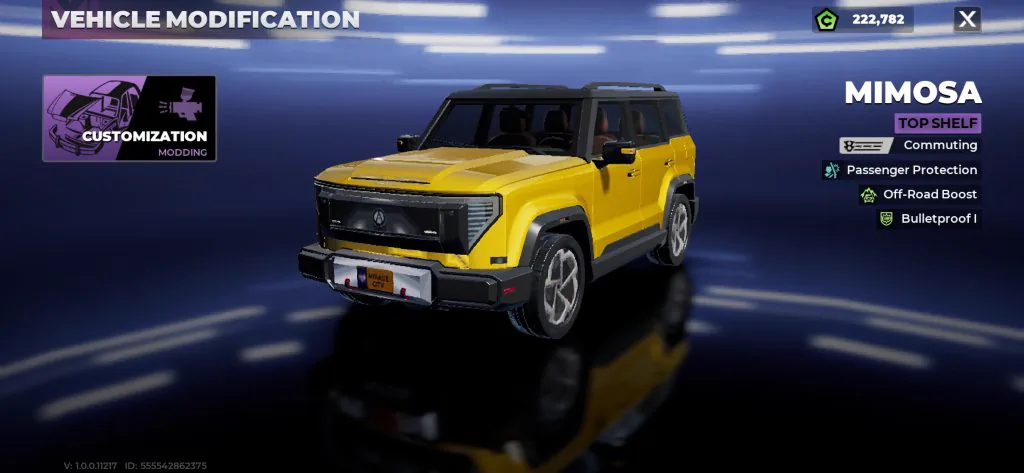
- Read the full Mimosa vehicle guide — See its traits, best uses, upgrade priorities, and comparison with Beekman and Rhea.
Beekman is a Commuting sedan
Beekman is a Top Shelf Commuting sedan with Passenger Protection and Blastproof I. Use it for passenger travel or objectives where blast protection is useful. Mimosa is the alternative when Off-Road Boost or Bulletproof I better matches the route.
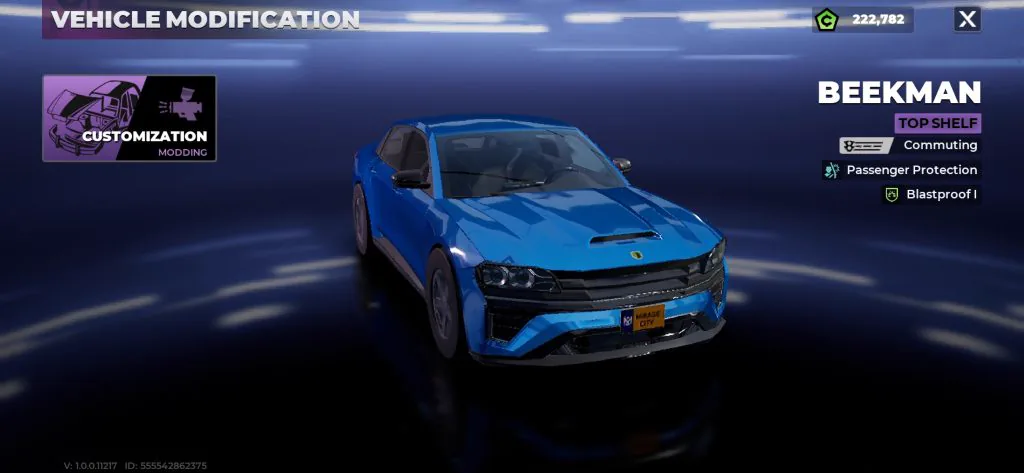
- Read the full Beekman vehicle guide — Use its Passenger Protection and Blastproof I for suitable routes.
Rhea is a Commuting vehicle
Rhea is an Excellent Commuting vehicle with Off-Road Boost. It can handle a Commuter-type objective and routes that leave paved streets. Check for any extra sale, stolen-vehicle, or modification instruction before completing the action.
- Read the full Rhea vehicle guide — Follow the Commuting type, selling, and modification checks.
How to identify a Commuter vehicle in Gangstar Mirage
Check the car before paying for upgrades or driving across the city. A sedan, SUV, or ordinary street car is not automatically a Commuting vehicle.
- Open the vehicle selection or Vehicle Modification screen at a Car Mod Shop.
- Select the vehicle you plan to use.
- Read the type line below the rarity label.
- Continue only when that line says Commuting.
- If it says Racing or Armored, choose another vehicle for the Commuter objective.
- Keep the vehicle selected until the required sell or modification action has been confirmed.
How to sell one Commuter vehicle through the stolen car service
Use a stolen vehicle labeled Commuting when the objective specifically names the stolen car service. Selling an owned Racing or Armored vehicle does not match both parts of that requirement.
- If Sell is unavailable, check whether another vehicle already occupies the sale slot.
- If the selected car is not accepted, confirm that it was stolen and is eligible for the stolen car service.
- If the counter remains at 0/1, reopen the vehicle screen and verify the Commuting label instead of relying on appearance.
| Step | Action | What to check |
|---|---|---|
| 1 | Get an eligible stolen vehicle | Its Vehicle Modification screen must show Commuting. |
| 2 | Open the map | Choose a Car Mod Shop or the garage location used for vehicle services. |
| 3 | Drive the vehicle into the shop marker | Keep the same Commuting vehicle with you. |
| 4 | Select Enter Shop | Wait for the Vehicle Modification or vehicle service screen to load. |
| 5 | Open the stolen-car or sell service | Choose the Commuting vehicle, not a different stored car. |
| 6 | Select Sell and confirm | Read the confirmation before accepting the transaction or listing. |
| 7 | Check the objective counter | Return to the mission tracker and confirm that it changed from 0/1. |
How to modify one Commuter vehicle
When an objective asks for a modified Commuter vehicle, use the same type check before making a purchase. Opening the customization menu or previewing a part is not the same as applying a change.
- Bring Mimosa, Beekman, Rhea, or another vehicle visibly labeled Commuting to a Car Mod Shop.
- Enter the shop and select the same vehicle.
- Open Customization or Modding on the Vehicle Modification screen.
- Choose an available change that the current objective accepts.
- Confirm the cost and apply the change.
- Return to the objective tracker and verify completion before buying another part.
Which Commuting car should you use?
For a one-time objective, use the accessible eligible vehicle that completes the required action without blocking other upgrades. For regular driving, choose by route and protection needs rather than rarity alone.
| Situation | Practical choice | Reason |
|---|---|---|
| Sell-one stolen vehicle objective | Any eligible stolen car with a visible Commuting label | The type and service requirement matter more than performance. |
| Crew or passenger mission | Mimosa or Beekman | Both show Passenger Protection. |
| Rough roads | Mimosa or Rhea | Both show Off-Road Boost. |
| Gunfire during travel | Mimosa | Its screen shows Bulletproof I. |
| Blast risk | Beekman | Its screen shows Blastproof I. |
| Lowest-cost completion | Check the current eligible vehicle and service price | Prices and availability can differ by account or version. |
Why the Commuter vehicle objective is not counting
| Problem | Likely cause | Fix |
|---|---|---|
| The car looks like a normal commuter but the counter stays at 0/1 | Appearance does not determine the in-game type | Open Vehicle Modification and confirm that the label says Commuting. |
| The sell option is missing | The vehicle may not qualify for the stolen car service, or another sale slot is occupied | Try an eligible stolen Commuting vehicle and check current listings. |
| A car was sold but the objective did not move | The selected vehicle may have been Racing or Armored | Repeat the type check before confirming another sale. |
| A modification was previewed but not counted | The change may not have been applied | Purchase or apply one accepted change, then leave the shop and check the tracker. |
| The menu differs from the video | The platform, region, account progress, or game version may differ | Follow the labels in the current build and unlock the relevant shop service first. |
Commuter vehicle in Gangstar Mirage City FAQ
| Question | Answer |
|---|---|
| What is a commuter vehicle in Gangstar Mirage City? | It is a vehicle whose Vehicle Modification screen shows the type Commuting. Commuter is the wording used in the objective, while Commuting is the vehicle type shown in the menu. |
| Which Gangstar Mirage City cars are Commuting vehicles? | Mimosa, Beekman, and Rhea are Commuting vehicles. Check the type shown in Vehicle Modification before using any other car for the objective. |
| Does any sedan or SUV count as a Commuter vehicle? | No. Body style does not determine the type. A sedan or SUV counts only when its vehicle information screen labels it Commuting. |
| Where do you sell a Commuter vehicle? | Take an eligible stolen Commuting vehicle to a Car Mod Shop, enter the shop, open the stolen-car or sell service, select the vehicle, and confirm the Sell action. |
| Can Rhea complete a Commuter vehicle objective? | Yes. Rhea is a Commuting vehicle. If the objective also requires a stolen car, a sale, or a modification, complete that action with an eligible Rhea. |
| Why can I not sell another vehicle? | A current selling flow can limit the available sale slot while another vehicle is listed. Check the active listing and whether the selected stolen vehicle is eligible for the service. |
| Do I need to buy Mimosa or Beekman for the mission? | Not when the objective accepts another eligible stolen vehicle labeled Commuting. Check the exact objective wording before buying a vehicle only to complete one task. |
Continue with vehicles and missions
- Browse all known cars and vehicles — Compare current vehicle names, roles, and traits.
- Open the Beekman guide — Use passenger and blast-protection traits.
- Open the Rhea guide — Use Off-Road Boost and complete Commuter objectives.
- Choose a car by activity — Match the vehicle to missions, races, heists, and escapes.
- Open the missions guide — Continue story, Contact, Company, and Crew objectives.
- Find the nearest district route — Use the Rooklyn map for garages and mission travel.