
Direct answerRhea is an Excellent-quality Commuting vehicle with Off-Road Boost. It can satisfy a Commuter-type objective when the task accepts Commuting vehicles, but a sale objective also requires an eligible stolen vehicle and a modification objective requires an applied change. Check the current vehicle screen for its price and acquisition route.
On this page
Rhea vehicle details
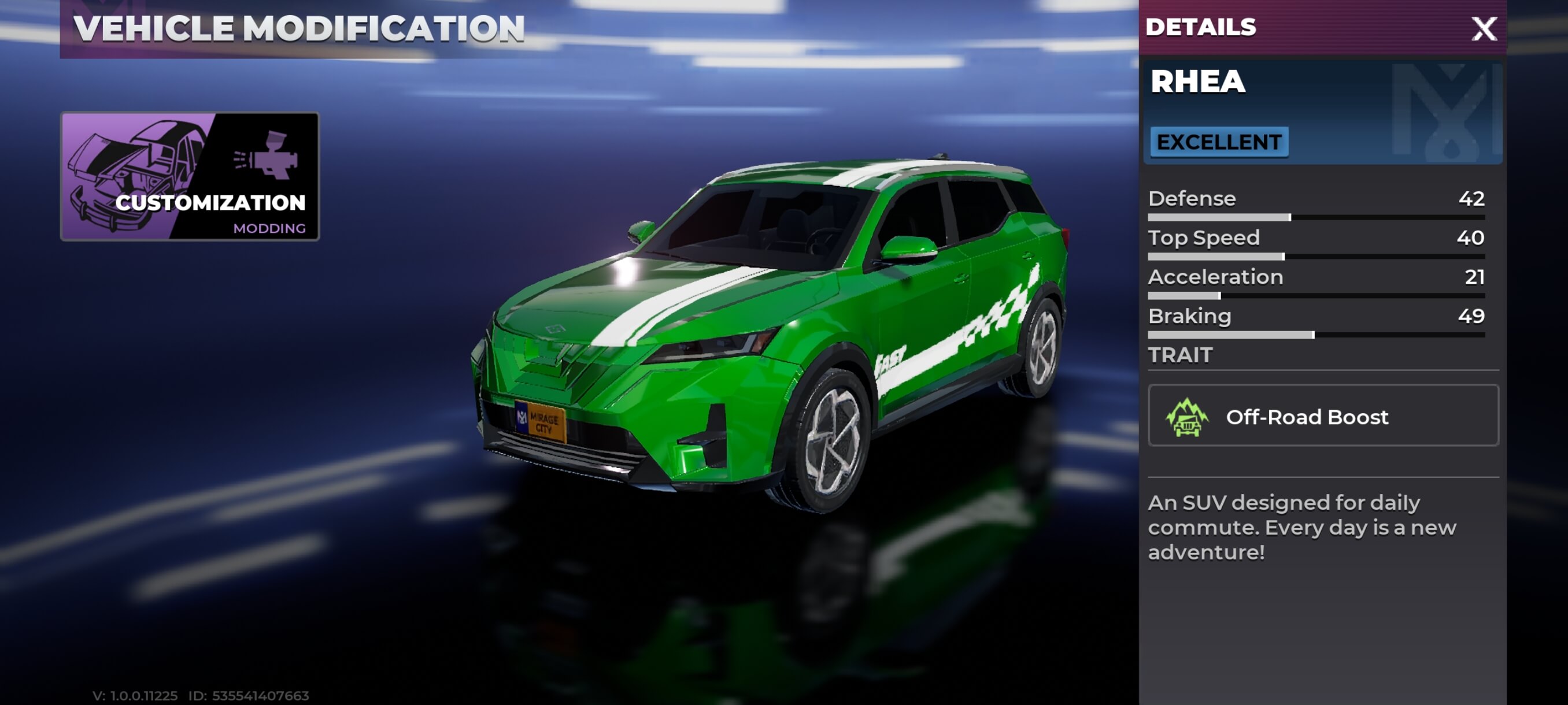
| Field | Rhea information |
|---|---|
| Vehicle | Rhea |
| Quality shown | Excellent |
| Type shown | Commuting |
| Defense / Top Speed | 42 / 40 |
| Acceleration / Braking | 21 / 49 |
| Visible trait | Off-Road Boost |
| Commuter objective | Eligible when the task accepts the Commuting type |
| Price and unlock | Check the current vehicle screen |
How to use Rhea for a Commuter objective
Read the full objective before acting. The Commuting label solves only the vehicle-type requirement; the same task may also ask for a stolen vehicle, a completed sale, or an applied modification.
| Objective wording | Action with Rhea |
|---|---|
| Use a Commuter vehicle | Select Rhea and confirm its type reads Commuting. |
| Modify a Commuter vehicle | Apply one available change to Rhea, then check the objective counter. |
| Sell one through the stolen car service | Use an eligible stolen Rhea, complete the Sell action, and verify the counter. |
| Drive on mixed surfaces | Use Off-Road Boost when the route leaves paved streets. |
| Protect passengers from gunfire or blasts | Choose Mimosa or Beekman when their visible protection traits match the threat. |
How to find and identify Rhea
- Open the vehicle collection, garage, or Vehicle Modification screen.
- Select Rhea and read the line beneath its quality label.
- Confirm that the type says Commuting and the visible trait says Off-Road Boost.
- Read the current acquisition, storage, or sale status before spending currency.
- Keep the same Rhea selected until the mission tracker records the required action.
If the Rhea objective does not count
| Problem | Fix |
|---|---|
| Rhea was selected but the counter stayed at 0/1 | Check whether the task also requires a sale or modification. |
| A modification was previewed | Apply and pay for an accepted change, then leave the shop and check the tracker. |
| The Sell option is missing | Confirm that the Rhea is stolen and eligible for the current stolen-car service. |
| The car is difficult to locate | Check the current collection or garage prompt instead of relying on a fixed street spawn. |
| The menu differs from a video | Follow the labels and service availability shown on the current account. |
Rhea FAQ
| Question | Answer |
|---|---|
| What type of vehicle is Rhea? | Rhea is shown as an Excellent Commuting vehicle. |
| What trait does Rhea have? | Its visible vehicle screen lists Off-Road Boost. |
| Can Rhea complete a Commuter mission? | Yes, when the task accepts the Commuting type. Complete any additional stolen, sale, or modification requirement. |
| Where can I find Rhea? | Check the current vehicle collection, garage, and street vehicles available to the account. A fixed universal spawn is not confirmed. |
| How much does Rhea cost? | The available screen does not confirm a fixed price. Read the current acquisition or purchase prompt. |
Continue with vehicles and missions
- Follow the full Commuter objective guide — Use the correct type, sale, and modification checks.
- Compare Beekman traits — Choose passenger and blast protection when needed.
- Browse all known vehicles — Compare roles, body styles, and visible traits.
- Open the missions hub — Prepare for the next vehicle objective.